Back to: Linking to Care, Point of Care Testing (POCT). Aotearoa Edition
0
Preparation for conducting a Hepatitis C Virus (HCV) antibody Point of Care Testing (POCT) Rapid Diagnostic Test (RDT) as part of the Health Network Collective community starts with learnings from lessons one of this course. Our mindset, conduct and approach to the interaction with our wai ora for testing begins before we consider introductions explanations or testing.
- From Section one: Overview and Learning Agreement
- We act in accordance with Health Network Collective Guidelines, including respecting United Nations Universal Declarations, and our obligations as part of Health Network Community.
- From Section two: People Centered Practice and Personal Safety
- We act in confidence, in the interest of our wai ora and with consideration for medical ethics. Remembering our roles, capabilities (sticking to our role and constraints of what we have been taught) and importantly our limitations. Health Network Collectives “No Surprise” policy with informing, and asking for advice or help.
- Our workplace and environment is meeting or exceeding health & safety requirements, and our personal safety is planned and prepared.
- From Section three: Hepatitis C (HCV)
- We have a comfortable evidence based, basic conversational level knowledge of HCV, POCT and possible outcomes. Keep it simple, too technical we risk confusion, inaccuracies and risk adding to stigmas that may exist. And, we do not pretend to understand issues habits or behaviors we do not have lived experience of. Even with lived experience, everyone’s story and journey is their own.
- This is an educational opportunity, clear concise and simple conversations. We need wai ora to have opportunity for equitable health access, and we may be able to provide that gateway with friendly faces from familiar places, honesty and clarity, reducing stigma is a side effect we want.
- From Section four: Basic Hygiene
- We are clean and presentable; our personal hygiene is of a high standard.
- If in a clinic or static type workplace, the site is clear of clutter and meets our Infection Prevention and Control needs. This includes accessibility to gloves, mask and waste disposal means.
- If mobile or in the field, we are prepared, especially for respecting our 5 moments of hand hygiene and hand washing.
- We have a contamination contingency plan, and response, ready. This may simply be a bottle of alcohol-based hand sanitizer to supplement our standard Infection Prevention and Control.
- From This Section: Rapid Diagnostic Test (RDT)
- You will need your Health Network Collective mobile application with full logins and access to “Conduct HCV Test“
- Ensure you have the appropriate test kit.
Initiating your test
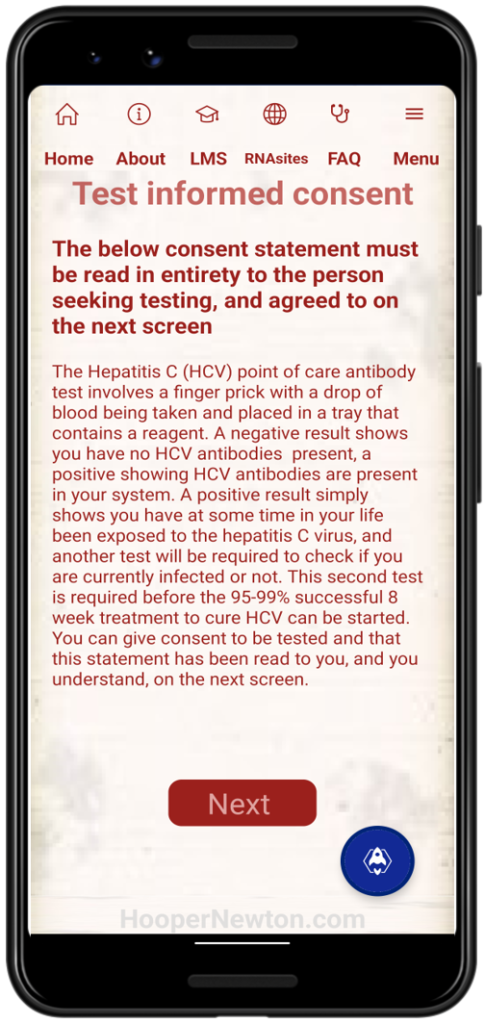
- Your Health Network Collective Mobile App has a step-by-step guide to conduct the test and record results.
- Once logged in, click and open Conduct HCV Test
- The first screen you will see is a Test Informed Consent screen. This must be read in full to our wai ora getting tested.
- Once read to the wai ora seeking testing we recommend you ask the wai ora if they have understood the consent and agree to the consent and being tested.
- Press Next once your wai ora has agreed.
- In the event your wai ora does not agree, indicate this on the next screen along with at least the wai ora name or identity.
- Your next screen is for the HCV Test Personal Details, that is the details of the wai ora seeking testing.
- The more details we can gather here the higher the success rates may be of matching our wai ora to records for further tests and linking to care in the event they have a positive result.
- At this stage the app will record a date and time of data entry in the background as an automated process.
- In the event your organization uses anonymized or ‘ghost’ identities (such as with some HIV wai ora) please ensure the entry is correct, and can be related back your anonymized or ‘ghost’ identity records.
- This information will form the basis of records and logins as required.
- Enter Yes / No for consent statement. If NO, do not proceed.
- Press Next